Photos and atmosphere
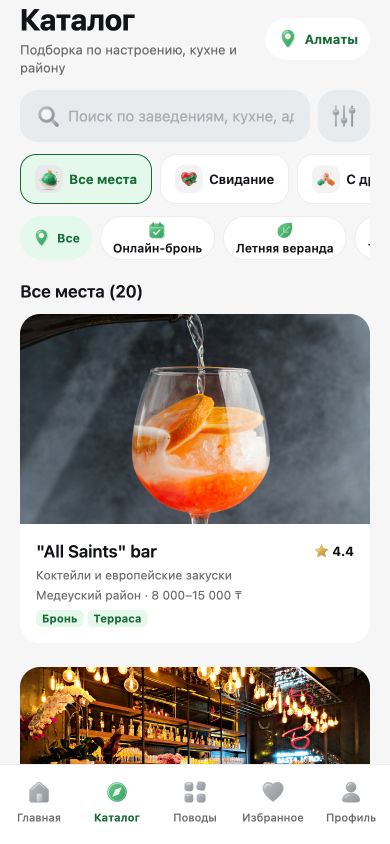
Get a feel for a place before you go: photos, highlights, average check and location.
Almaty’s restaurants, cafes and bars for your evening out. Choose on your own or with friends, check the menu and book a table. It all starts with one place.
Right in your browser · nothing to install
THE WHOLE CITY IN ONE CATALOG
From coffee around the corner to dinner with a big group. Compare places by what matters to you and save the ones you want to come back to.
On the venue page
Get a feel for a place before you go: photos, highlights, average check and location.
Browse the menu where available and find the phone number, website and other locations.
Open a route in 2GIS or jump to Yandex Go right from the venue page.
CHOOSE YOUR WAY
Set the occasion and your preferences. Swipe through places that fit, mark the ones you like and open the full venue page without losing your picks.
Create a group and send your friends a link. Everyone picks on their own phone, and Kesh finds the matches to help you agree on a place.
TABLE BOOKING
Enter the date, time, number of guests and your contact details. Add any notes and send your request to the restaurant. You’ll find the reply and status in your bookings.
Date, time and number of guests.
No food pre-order required.
Your table is booked once the restaurant confirms.
Booking through Kesh is available at venues that accept requests. Where it isn’t, the venue page still lists the restaurant’s contact details.
FOOD PRE-ORDERS
Pick dishes from the menu, fill your cart and add notes for your visit. Pre-ordering is a separate option for when you’d like to arrange the food with the restaurant ahead of time.
Categories, available dishes and prices in one place.
Servings, available sizes and add-ons.
Check what’s in your cart and the current total.
Say how you’d like your dishes served; details are agreed with the restaurant.
For now, you can browse menus and build a cart. Sending pre-orders to restaurants isn’t available yet: we’re getting venues connected. Adding dishes to your cart doesn’t place an order on its own.
Favorites for the places you want to come back to.
Your past picks, bookings and their statuses in your profile.
Kesh runs in the browser, including on your phone, in Russian, Kazakh and English.
KESH BUSINESS
Guests get an easy path from choosing a place to sending a request. Your restaurant team gets its own workspace to manage visits, seating and the menu.
Review bookings, confirm visits and track their status.
Manage tables, service hours and availability, including bookings made outside Kesh.
Work with your menu and dish approvals; sending orders to the POS is coming soon.
We’re preparing iiko and R-Keeper integrations to send orders to your restaurant’s system.
Already working with Kesh? Go straight to Kesh Business.
Yes. Open the catalog, pick solo or choose with friends. Browse menus, save places and get directions — booking is optional.
Yes. A table request is separate, and you don’t need to choose dishes in advance.
No. Wait for the restaurant to confirm. You can check the current status in your bookings.
Not yet. You can browse menus and build a cart. We’ll turn on pre-orders once restaurant connections are tested.
No. On the web, opening the invite link in a browser is enough. iOS and Android apps are getting ready for release.
KESH · WEB / iOS / ANDROID
iOS and Android apps are getting ready for release. Until then, open Kesh right here.
Mobile apps in development